More initiatives than I could hold in my head.
A home lab rebuild. A sourdough starter I'm trying not to kill. A reading tracker I've rebuilt three times. A garage workshop that's been "almost organized" for a year. I was running all of it at once, and for a long time the only place that knew about all of it was my own memory — which is exactly as reliable as that sounds.
Every tool I tried made me choose.
A project manager wanted everything typed in by hand. A notes app had no sense of stage or priority. None of them could tell the difference between "I decided this" and "this just happened on its own" — and none of them told me the truth when something had quietly stalled.
I rebuilt the same database four times. Every status change was a status I typed in — which meant it was only ever as current as the last time I remembered to open it.
Cards don't expire. A board can't tell a card that's actively blocked from one I just haven't touched in three weeks. Everything sat in "Doing" forever, including the things that weren't.
One I built myself, tracking nothing but my sourdough starter's feeding schedule. It could remind me to feed it. It had no idea whether I actually had, and no way to flag it when three days went by in silence.
So I built the thing I actually wanted: a pipeline that pulls in whatever signal it can find on its own, asks me for the rest, scores what's worth doing next, and refuses to mark a step done unless it actually is. If something needs my hands, it says so in plain language, and it waits.
What started as a weekend fix for my own scattered hobbies turned into the kind of backend work I actually enjoy: a real ingestion pipeline, a model that retrains on my own history, a dashboard that updates itself without a refresh.
Every initiative deserves one place to live.
A dashboard that admits what it doesn't know.
Not a project manager with a nicer skin. It's built out of the pieces you'd expect: a log, a queue, a settings screen. What's different is what happens when one of those pieces can't finish something on its own — it says so, in plain language, instead of quietly assuming the job got done.
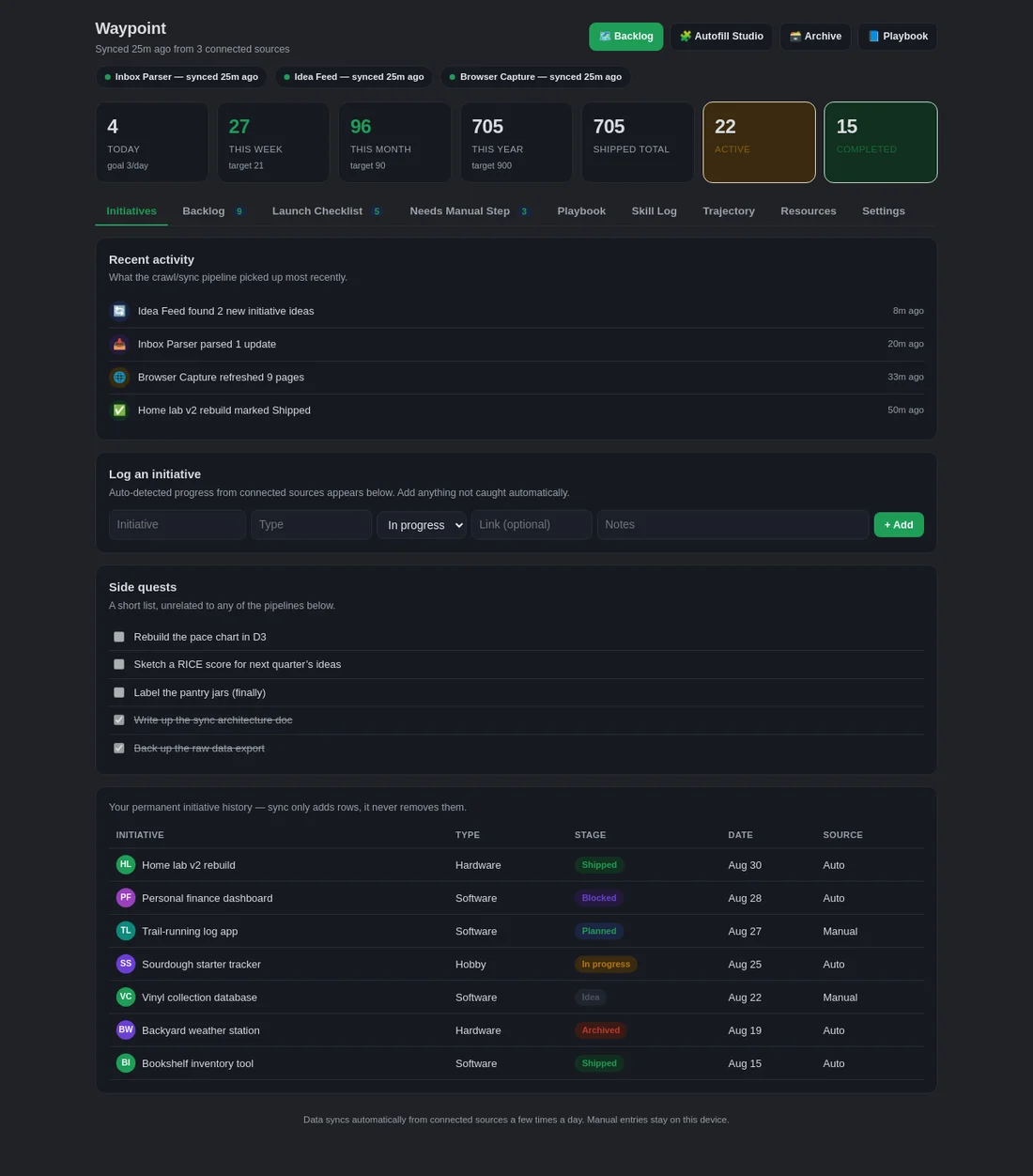
Initiatives Log
Every initiative, software, hardware, a hobby, a half-formed idea, logged from first spark to shipped, each with its own timeline and source.
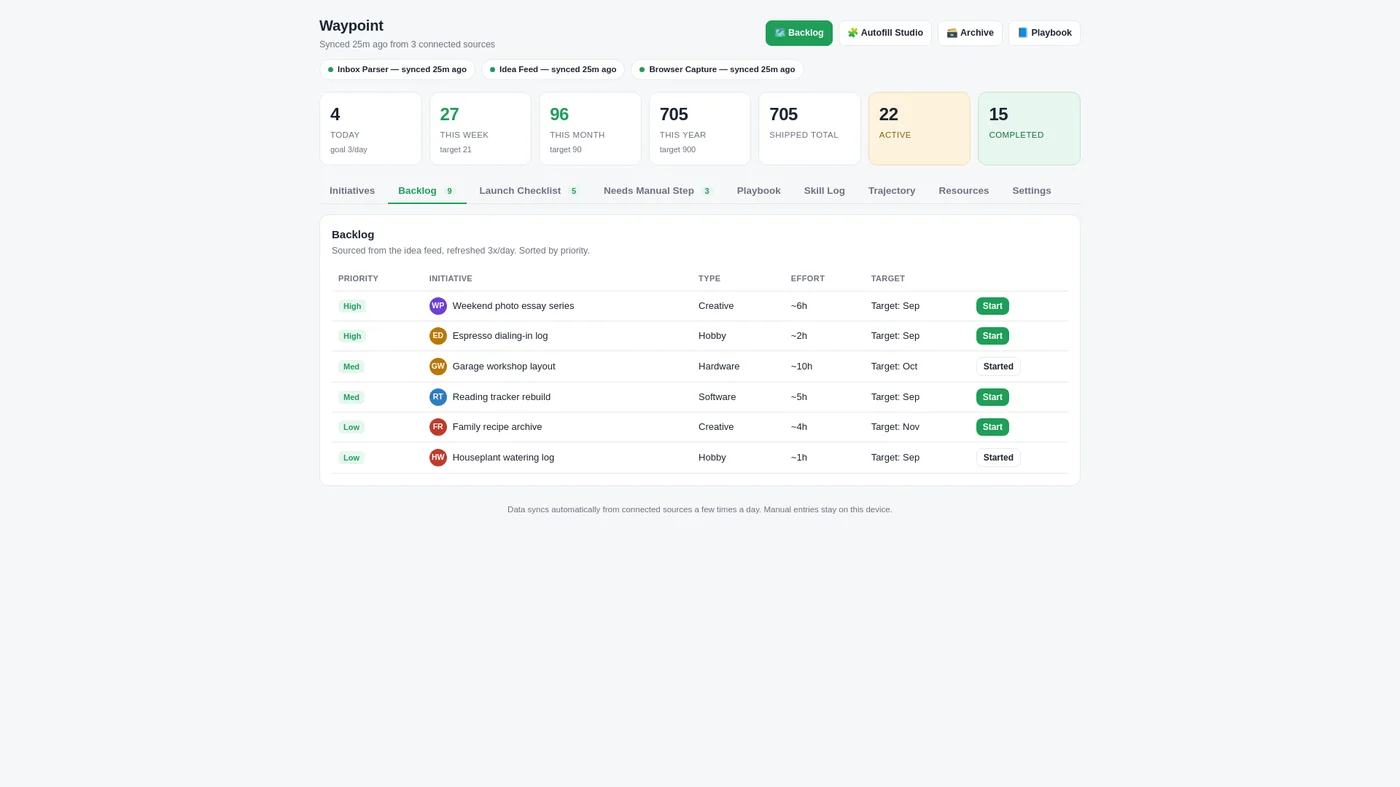
Backlog
One ranked queue instead of six sticky notes and a list I half remember. Priority, effort and target date, side by side.
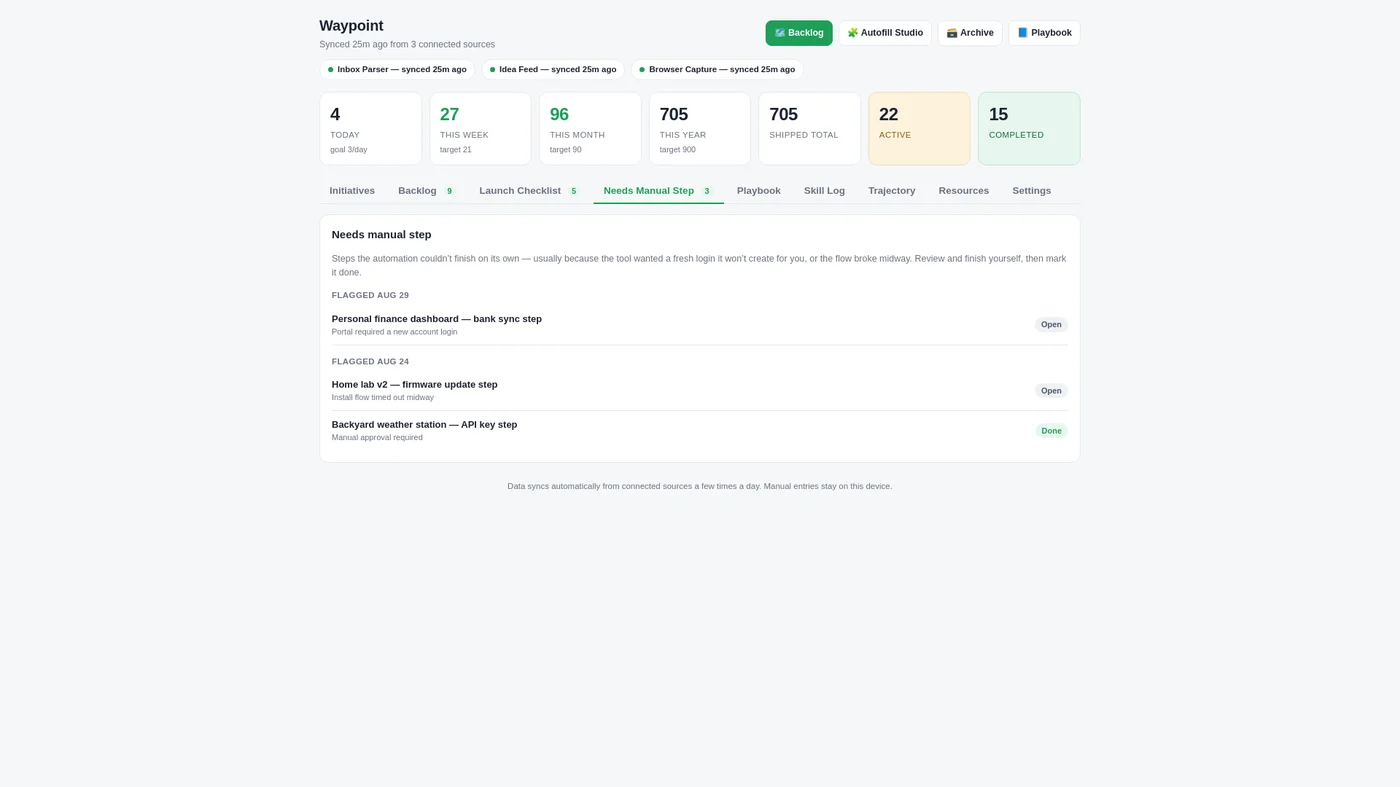
Needs Manual Step
The system automates what it can. It's honest the instant it can't. No silent failures, no faked completion.
Trajectory
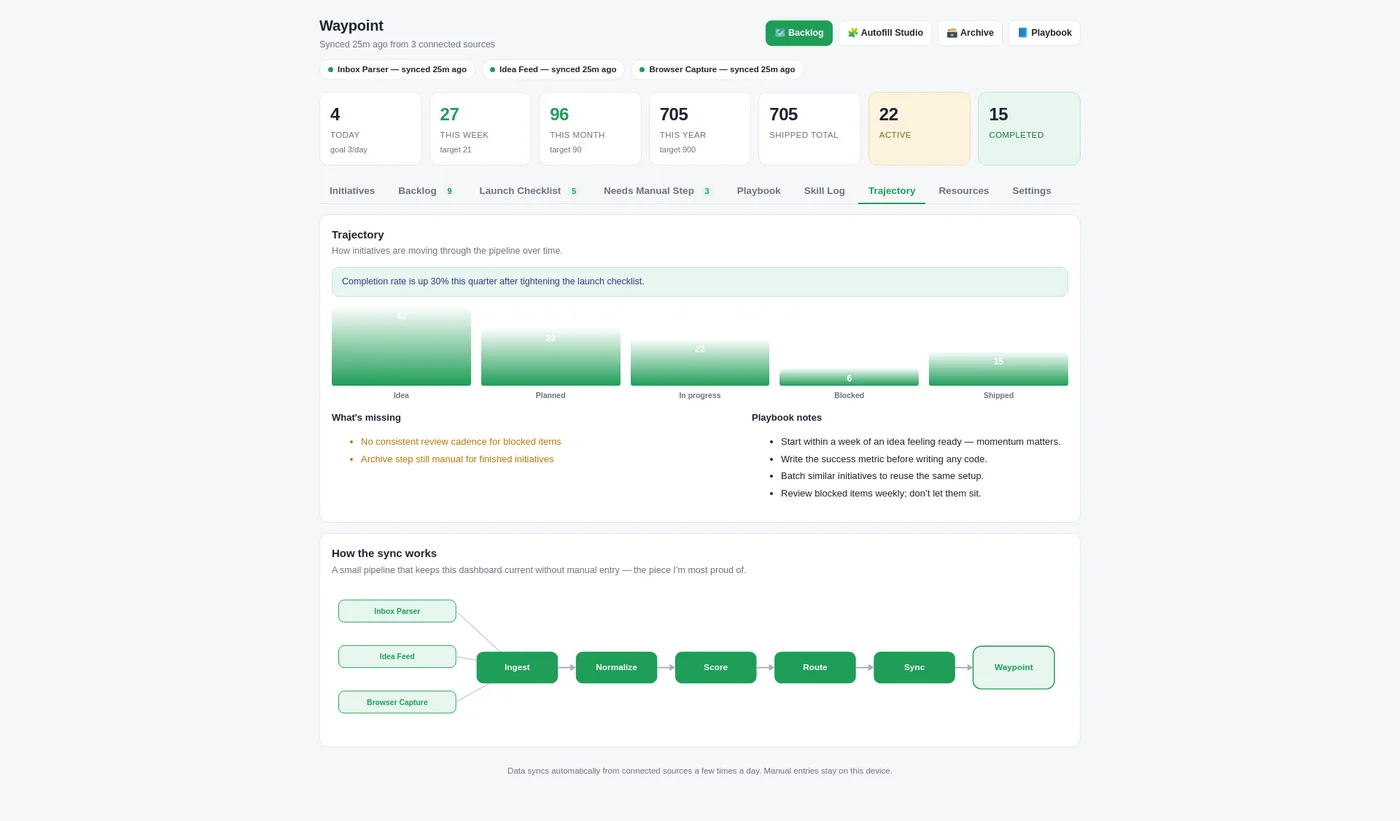
A five-stage funnel plus plain-language notes on what's actually stuck, and why, read straight off the chart itself.
Command palette
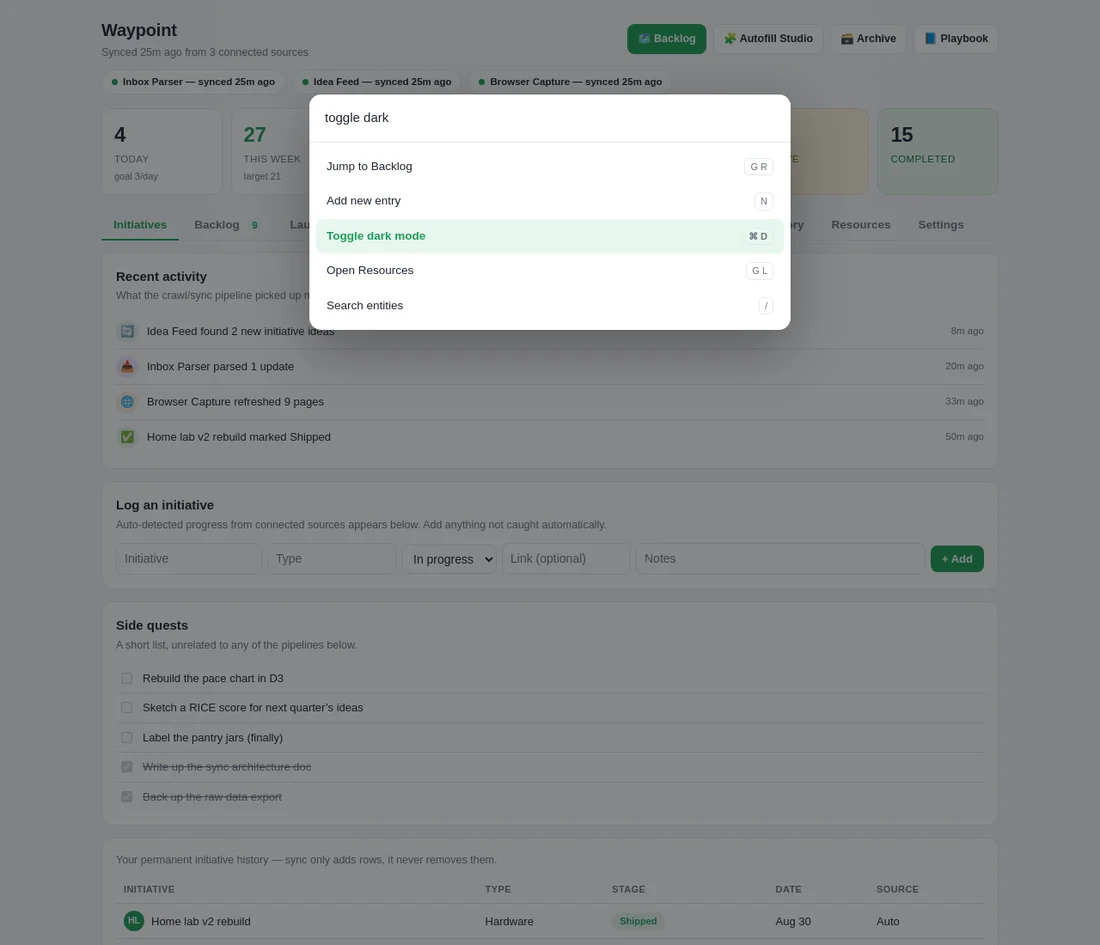
Cmd+K reaches any screen, any action, any search in under a second. No hunting through tabs.
Dark mode
Because most of the actual logging happens after a long day.
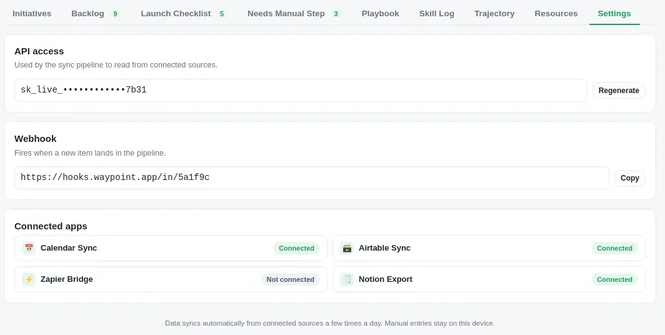
Settings
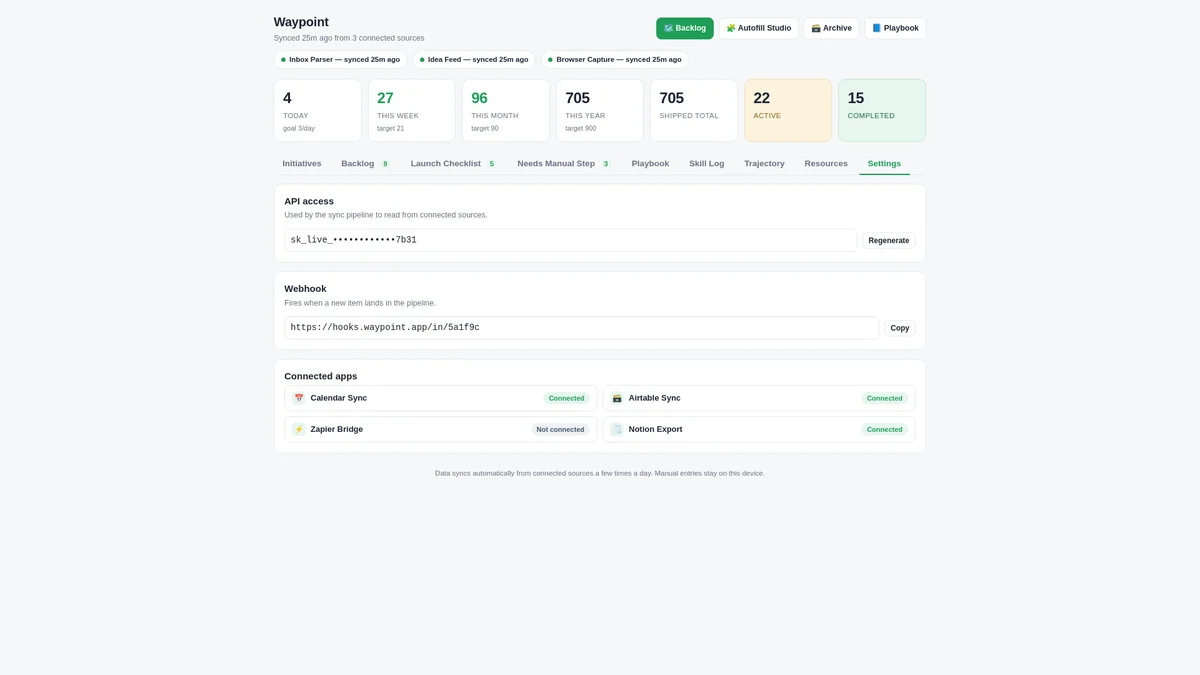
The API key, the webhook, and the connected-app list underneath it all. Boring on purpose.
One inbox for every idea I've ever had.
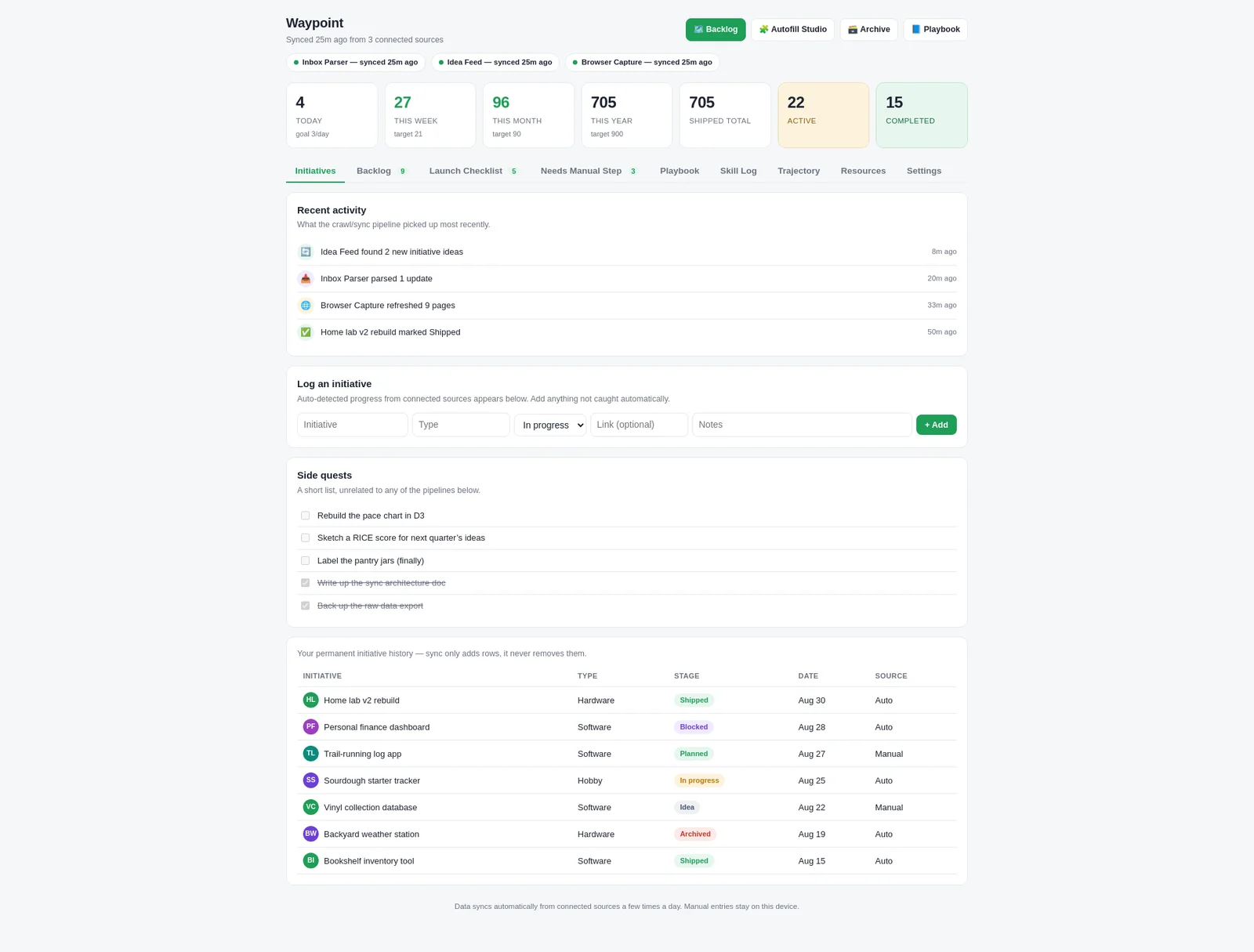
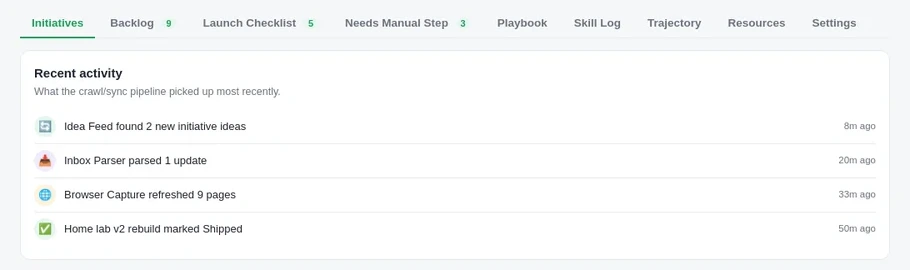
Three passive sources feed it on their own: an inbox parser that reads structured updates, an idea feed that catches things I jot down on the go, and a browser capture that watches the handful of pages I track. Anything they miss, I add by hand: initiative, type, stage, and a note. Either way it lands in the same permanent history. Sync only ever adds a row. It never quietly removes one.
- Auto-detected activity surfaces as it happens. "Idea Feed found 2 new initiative ideas," "Browser Capture refreshed 9 pages." I'm reacting to real signal as it comes in.
- Every entry carries a type, a stage, a date and a source, so an auto-detected row is never confused with something I typed in myself.
- A running log of everything I've shipped, blocked, archived or quietly let go. The record doesn't flatter me. It just keeps count.
A queue that ranks itself.
Everything open lives in one prioritized list, resorted three times a day by the same pipeline that ingests everything else. Priority, effort and target date sit side by side, so the top of the list is usually the thing actually worth starting next, not just the thing I thought about most recently.
- High-priority items surface first regardless of when they were logged. Recency isn't mistaken for importance.
- An effort estimate rides next to every item, so a six-hour project and a one-hour one aren't competing on the same footing.
- One click moves an item from queued to started. The backlog and the initiatives log stay in lockstep automatically.
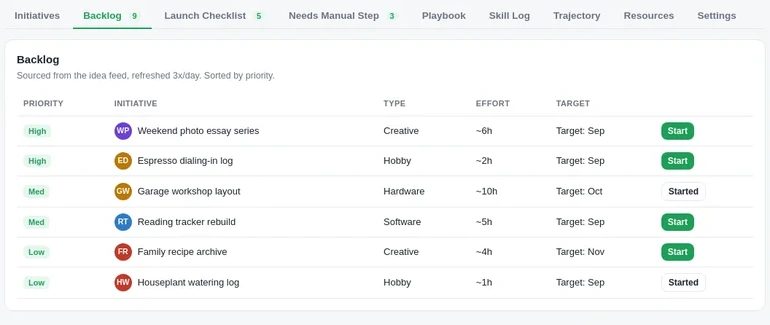
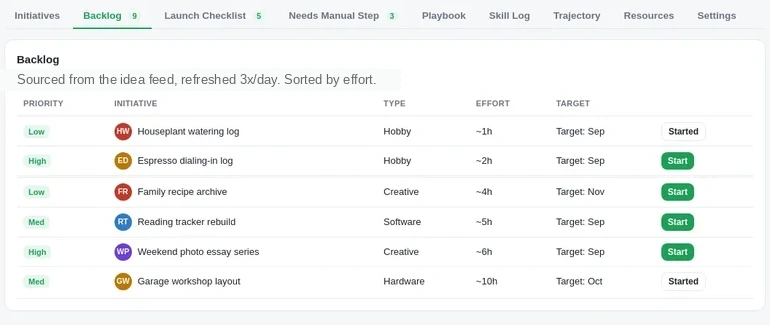
Same queue, re-sorted. One click, no retyping.
The part every other tool hides.
Automation fails sometimes. A source stops responding, a page layout shifts underneath a scraper, a step needs a confirmation it can't give on its own. Most systems paper over that or fail silently. This one does neither. The moment a step can't finish, it drops into a visible queue with a plain-language reason, and it stays there, flagged and dated, until I close it out by hand.
- Every flagged item names exactly what broke: "bank sync portal wanted a fresh login," "install flow timed out midway." Specific enough to act on immediately.
- Nothing marks itself done. A step only clears when I clear it, which is the whole point.
- It's the feature I'm most stubborn about. An honest "I couldn't finish this" beats a confident lie, every time.
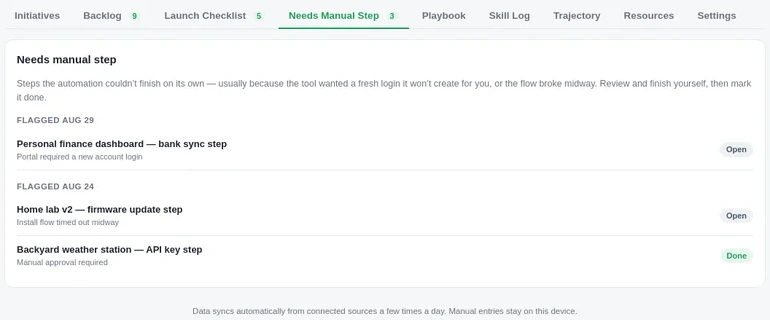
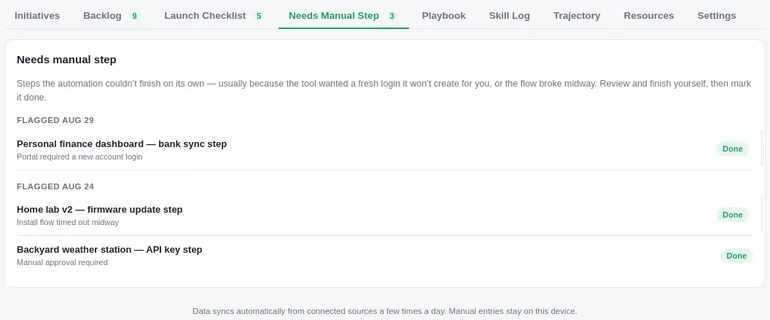
Nothing clears itself. I click each one closed by hand.
The pipeline underneath, in plain sight.
The funnel shows how initiatives move through five stages: idea, planned, in progress, blocked, shipped. With the same honesty as everywhere else in the tool, "no consistent review cadence for blocked items" sits right next to the chart it's describing, not buried in a report nobody reads.
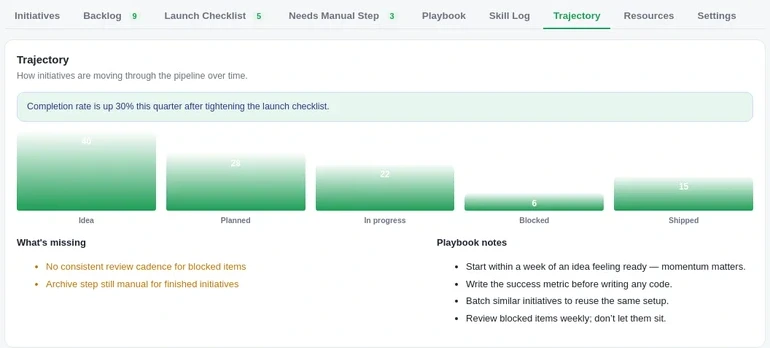
Underneath, it's a small real pipeline, not a spreadsheet with a cron job. Three sources ingest into a Kafka-compatible Redpanda stream with exactly-once delivery, so a flaky source can't double count an update. Everything gets normalized and deduplicated with OpenAI embedding similarity before it reaches a table, so the same idea logged two different ways collapses into one row instead of two. A LightGBM model retrains nightly against my own history and produces a versioned score for the backlog ranking, so "why did this get reprioritized" always has a real answer. Updates reach the dashboard over server-sent events: the numbers move without a refresh. Infrastructure is Terraform end to end, with OpenTelemetry traces feeding a small Grafana board so I know within a minute if a source has gone quiet.
- Ingest, normalize, score, route, sync. Five stages, each independently observable, none of them a black box.
- Circuit breakers isolate a broken source instead of letting it take the whole pipeline down with it.
- Every scoring run is versioned. The ranking can always explain itself.

Cmd+K, and a theme that doesn't punish you for using it late.
A command palette reaches every screen, every action and every search without leaving the keyboard. And because most of the actual logging happens after a long day, dark mode isn't an afterthought skin. It's the same interface, properly re-lit.
- Jump to Backlog, add a new entry, toggle the theme, open Resources. All from one prompt, all with a visible shortcut.
- Search reaches every entity in the system, not just the current tab.
- Dark mode carries every state: priority chips, stage pills, the funnel chart, without anything going illegible.
Ordinary infrastructure, kept ordinary.
An API key the sync pipeline uses to read from connected sources, a webhook that fires when something new lands, and a short list of connected apps. Nothing exotic, because the interesting engineering already happened upstream. This screen's whole job is to be boring and trustworthy.
- Keys are masked by default and regenerate in one click if I ever need to rotate one.
- The webhook is how anything outside the system, a script, a shortcut, can push a new item in without touching the UI.
- Connected-app status is honest about what's actually wired up versus what's just listed.
Straight out of the working build.
Nothing below is a render. These are captures of the actual interface. The pipeline and the architecture are real; the specific initiatives and numbers shown are illustrative, swapped in for this write-up rather than what I track day to day.

Scroll sideways · 10 screens
The questions people actually ask.
What is Waypoint, exactly?
A personal dashboard for tracking every initiative I'm running at once: software, hardware, hobbies, half-formed ideas. Pulled in automatically from a few passive sources and ranked by what's actually worth doing next.
Can I use it?
Not right now. It's a closed, personal system built around my own workflow and my own data sources, not a public product. If the engineering is interesting to you, I'd genuinely like to talk about it. Email me.
What does "Needs Manual Step" actually mean?
It's the honesty valve for the whole system. Automation fails sometimes: a source stops responding, a step needs a confirmation only I can give. Instead of retrying silently or marking something done when it isn't, the step drops into a visible queue with a plain-English reason, and it stays open until I close it myself.
What's next for it?
A more polished mobile layout, and tightening the review cadence for anything that's sat blocked too long, which the Trajectory tab already flags on its own.
Curious about the build?
It's not a public product, but I like talking about the engineering: the sync pipeline, the scoring model, the manual-step honesty. Email me if any of it's interesting to you.
Waypoint is a personal pipeline-intelligence dashboard, built on the side.
This is a closed, personal system, not a shipped product. Access isn't available. The screens above are real interface work; the specific data shown is illustrative, standing in for what I track day to day.
© 2026 Shreyansh Ojha. All rights reserved.